
What Size and Shape Tables does Equal-i 2S work with?
Answer: The Equal-i System is most effective with elongated tables between 10-18 Feet/Meters that are slightly wider than a normal conferencing table and seat anywhere between 4 and 20+ participants. However, other room parameters can effect the performance of Equal-i such as table width, display(s) size and orientation.
You can see the best table shapes and sizes for DX Camera Module Here: http://arraytelepresence.com/products/dxdualcameramodule/
You can get our Reference Designs for 8, 12, and 16 person tables here: https://www.scribd.com/doc/289485795/Array-s-8-12-and-16-Person-Table-Specifics
We can provide a complimentary room design to show how a particular table shape would be captured and displayed including the percentage of lifesize.
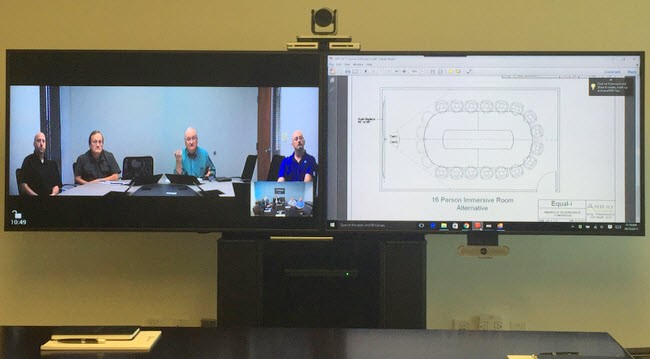
Here is an example of a complimentary room design showing how Array would integrate into an existing boardroom with dual 98 inch displays and what improvements to the experience the board could expect.
Our executives like the “across-the-table” experience of their existing 3-Screen telepresence system. Can you duplicate it?
Answer: Yes. Except our version has more participants, a concealed camera, better eye-line and will save you $300,000 over the lifetime of the system and can be integrated exactly how you want it.
Array Equal-i DX Integration vs Cisco IX5000
Here is a design for an enterprise client whose executives preferred the across the table experience of the Cisco IX 5000 but didn’t like the $50K annual maintenance costs. We designed a dual screen replacement that seats 2 more primary participants vs. the IX 5000, has a better eye-line, a concealed camera, and a better format for the local conversation and will save them over $300K per room over the lifetime of the system.
What if the table is narrow and there is always a participant who sits at the head of the table?
Answer: No Problem - We can off-set the camera to capture the head of a narrow table. E-mail us at [email protected] to see some examples and/or for instructions. We can layout the camera capture in a complimentary room design.
What does it look like when someone doesn’t have an Equal-i system on the far side?
Answer: Equal-i has the ability to send dual-screen Immersive video to non-Equal-i equipped locations, providing that the remote location has dual screens and a 1080p 25/30fps data channel. We also offer a single screen mode (pictured below) that can be sent to single screen environments. Despite being set to a single screen, Equal-i continues to offer a better experience than the PTZ, especially when going through a video bridge, an MCU or when connecting to desktops, tablets, and/or video soft clients like Blue Jeans Networks, Skype4B, Vaas-T, Videxio, Vidyo, and Zoom
 Array’s proprietary single-screen Video & Content view is better than a PTZ camera with perfect vertical eye-line
Video & Content - Array’s Equal-i Technology offers a single screen view that reduces the dual-screen immersive telepresence view to a single screen and offers a superior view to the Pan-Tilt-Zoom camera, especially when going through a video bridge or conferencing with participants on desktops, laptops, and/or mobile devices. Everyone is more visible and captured from perfect vertical eye-line with a better horizontal gaze angle for all participants. With dual-screen displays and Equal-i’s Immersive Everywhere capability, participants can switch between dual-screen immersive telepresence and Video & Content™ for a better data collaboration experience as well.
Can I utilize Equal-i Technology within my existing setup?
Answer: Absolutely! The Equal-i system easily incorporates into most existing conference rooms without the need for a refresh or additional hardware, allowing you the ability to improve the human factors of your conferencing experience.
In this ideation we are showing what a Mezzanine environment might look like with Equal-i Technology
Will Equal-i work with video walls?
Answer: Please contact Array Telepresence Sales for further information.
What is the output from the Equal-i System?
Answer: The output from our Image Processor into the codec is HDMI, operating at 1080p 25/30fps.
Are you able to do anything with the image coming from the remote site?
Answer: Yes. Using our Immersive PTZ* capability, the incoming image can also be improved as it passes through the Image Processor. Note: Immersive PTZ is scheduled for release during Q1 2016
There are a couple of caveats:
- For best results, the camera on the far end should be trained on the center line of the table.
- The image won’t be as resolute, since it is coming off a PTZ vs. the Equal-i DX camera module.
- The image won’t be shot from perfect vertical eye-line, since a standard PTZ is typically mounted ~14% off of perfect vertical eye-line.
Does the Equal-i System require any modification of settings before making a call?
ANSWER: The Equal-i System will retain the settings from its last call unless there is a control system in place to override this (Ex: Crestron, AMX, etc). If a user would like to change the framing from Immersive to Video & Content, then they may be able to do so at the push of a button via our Android or Windows app.
How are multi-point calls, MCUs, and VMRs with a mixture of different non-Equal-i endpoints handled?
Answer: Assuming a bridge - Equal-i’s proprietary single-screen Video & Content view is the best choice when connecting through MCUs, desktop videoconferencing programs, virtual meeting rooms, and Skype4B applications. The farthest participants are more visible than if you were using a pan-tilt-zoom camera and eye-line is improved to perfect vertical.
Do I have to have an Equal-i System on both ends for this to work?
Answer: No, you do not.
- When there is an Equal-i system on both ends, then you have the option of sending two-screen video over a single video channel. The receiving Equal-i system can then receive that video and splitting it back out onto both screens.
- When there is not an Equal-i system on the other end, but there is a dual-screen data-channel capable codec, then you can transmit two screen video over both channels to create the immersive experience.
- When there is not an Equal-i system on the other end, and there is either a single screen or a codec not capable of video and data at the same time, then our Video & Content mode is perfect for this scenario.
All of the above are easily available at the touch of a button!
Will the either end’s Equal-i system automatically configure itself based off the chosen framing mode of the opposite end?
Answer: Selection is manual via a control system, Windows or Android app. There is no automatic recognition of input type at this time, however that is on our technology roadmap.
Does Equal-i Technology offer a UVC compliant USB connection?
Answer: No, Equal-i has been built as an HDMI system, however there are many UVC compliant USB converters on the market. Array has had good success testing with the Magewell XI100DUSB-HDMI HDMI to USB 3.0 Video Capture Dongle. (http://www.magewell.com/usb-capture-hdmi)
Do you have a question that wasn’t answered here or that you feel would be helpful to others if it was displayed here?
Please e-mail us directly at [email protected]