
What size and shape tables does Equal-i work with?
Answer: The Equal-i System is effective with virtually any table size and shape. We have implementations with small, round tables in small rooms, elongated tables that stretch away from the displays and those that sit perpendicular to the displays, V-shaped, U-shaped, and many others.
You can see a sample collection of room, table, and display implementations here.
We can provide a complimentary room design to show how a particular table shape would be captured and displayed including the percentage of lifesize.
Our executives like the “across-the-table” experience of their existing 3-Screen telepresence system. Can you duplicate it?
Answer: Yes. Except our version has more participants, a concealed camera, better eye-line and will save you up to $300,000 over the lifetime of the system and can be integrated exactly how you want it.
Will the Equal-i System still work if we want to have someone sit at the center/head of the table?
Answer: No Problem - We can off-set the camera to capture the head of a narrow table. E-mail us at [email protected] to see some examples and/or for instructions. We can layout the camera capture in a complimentary room design.
What does it look like when someone doesn’t have an Equal-i system on the far side?
Answer: Equal-i has the ability to send dual-screen Immersive video to non-Equal-i equipped locations, providing that the remote location has dual screens. We also offer a single screen mode that can be sent to single screen or multi-point environments. Despite being set to a single screen, Equal-i continues to offer a better experience than the PTZ, especially when going through a video bridge, an MCU or when connecting to desktops, tablets, and/or video soft clients.
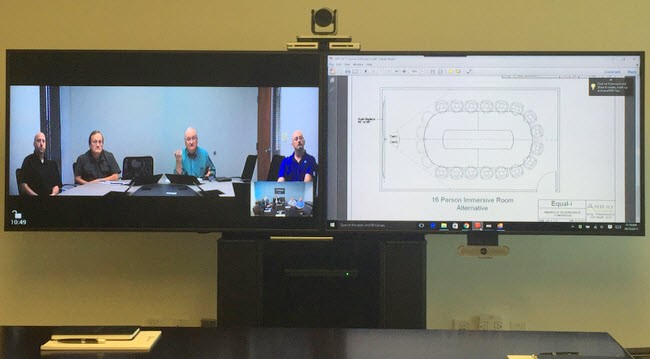
Video & Content™ - Array’s Equal-i Technology offers a single screen view that reduces the dual-screen immersive telepresence view to a single 32:9 screen and offers a superior view to the Pan-Tilt-Zoom camera, especially when going through a video bridge or conferencing with participants on desktops, laptops, and/or mobile devices.
Can I utilize Equal-i Technology within my existing setup?
Answer: Absolutely! The Equal-i system easily incorporates into most existing conference rooms without the need for a refresh or additional hardware, allowing you the ability to improve the human factors of your conferencing experience.
Will Equal-i work with video walls?
Answer: Please contact Array Telepresence Sales for further information about this type of implementation.
What is the output from the Equal-i System?
Answer: The output from our Image Processor into the codec is HDMI, operating at 1080p 25/30fps.
Are you able to do anything with the image coming from the remote site?
Answer: Yes. Using our Immersive PTZ* capability, the incoming image can also be improved as it passes through the Image Processor. There are a couple of caveats:
- For best results, the camera on the far end should be trained on the center line of the table.
- The image won’t be as resolute, since it is coming off a PTZ vs. the Equal-i DX camera module.
- The image won’t be shot from perfect vertical eye-line, since a standard PTZ is typically mounted ~14% off of perfect vertical eye-line.
Does the Equal-i System require any modification of settings before making a call?
ANSWER: The Equal-i System will retain the settings from its last call unless there is a control system in place to override this (Ex: Crestron, AMX, etc). If a user would like to change the framing from Immersive to Video & Content, then they may be able to do so at the push of a button via our Android or Windows app.
How are multi-point calls, MCUs, and VMRs with a mixture of different non-Equal-i endpoints handled?
Answer: Equal-i’s proprietary single-screen Video & Content view is the best choice when connecting through MCUs, desktop videoconferencing programs, virtual meeting rooms, and Skype4B applications.
Do I have to have an Equal-i System on both ends for this to work?
Answer: No, you do not.
- When there is an Equal-i system on both ends, then you have the option of sending two-screen video over a single video channel. The receiving Equal-i system can then receive that video and splitting it back out onto both screens.
- When there is not an Equal-i system on the other end, but there is a dual-screen data-channel capable codec, then you can transmit two screen video over both channels to create the immersive experience.
- When there is not an Equal-i system on the other end, and there is either a single screen or a codec not capable of video and data at the same time, then our Video & Content mode is perfect for this scenario.
All of the above are easily available at the touch of a button!
Will the other end’s Equal-i system automatically configure itself based off the chosen framing mode of the opposite end?
Answer: Selection is manual via a control system, Windows or Android app. There is no automatic recognition of input type at this time, however that is on our technology road map.
Does Equal-i Technology offer a UVC compliant USB connection?
Answer: No, Equal-i has been built as an HDMI system, however there are many UVC compliant USB converters on the market. Array has had good success testing with the Magewell XI100DUSB-HDMI HDMI to USB 3.0 Video Capture Dongle.
What protocol does the Equal-i system use to communicate over a network?
Answer: The Image Processor is controlled over Telnet protocol through its Ethernet port. We will be also adding SSH and SNMP in the near future via microcontroller firmware updates.
If I have multiple Equal-i systems deployed at my site, how can I determine which one to control?
Answer: Each unit has the ability to have their IP address assigned by DHCP or a static IP address. You can also assign a specific device name to each unit, commonly represented by room name, number, or location. The Equal-i system transmits a UDP beacon every 2 seconds that contains IP information and the device name. By receiving this information, our Windows and Android apps are both able to allow for the selection of the identified rooms. Alternatively, your control system can be configured to connect directly by the configured IP address of the system itself.
Do you have a question that wasn’t answered here or that you feel would be helpful to others if it was displayed here?
Please e-mail us directly at [email protected]